
Bhu Bharati will show you almost everything about a piece of Telangana farmland: the pattadar, the khata, the extent, the classification, even a market value. It just will not let you find it by name.
That single design choice explains most of the frustration behind searches like “Bhu Bharati land details search by name”. People arrive with a grandfather’s name and a village. The portal asks for a survey number and a khata number. Most of the guides online were written for Dharani or copy each other, and several describe fields that do not exist.
So we opened the live form on 16 October 2026 and read it field by field. This guide covers what the Land Details Search actually asks for, how to read what comes back, and what to do when a name is all you have.
Where the land details search lives
Open bhubharati.telangana.gov.in and scroll past the Transactional Services (registration, mutation, ROR corrections). The public lookups sit under Information Services. The one you want is Land details search.
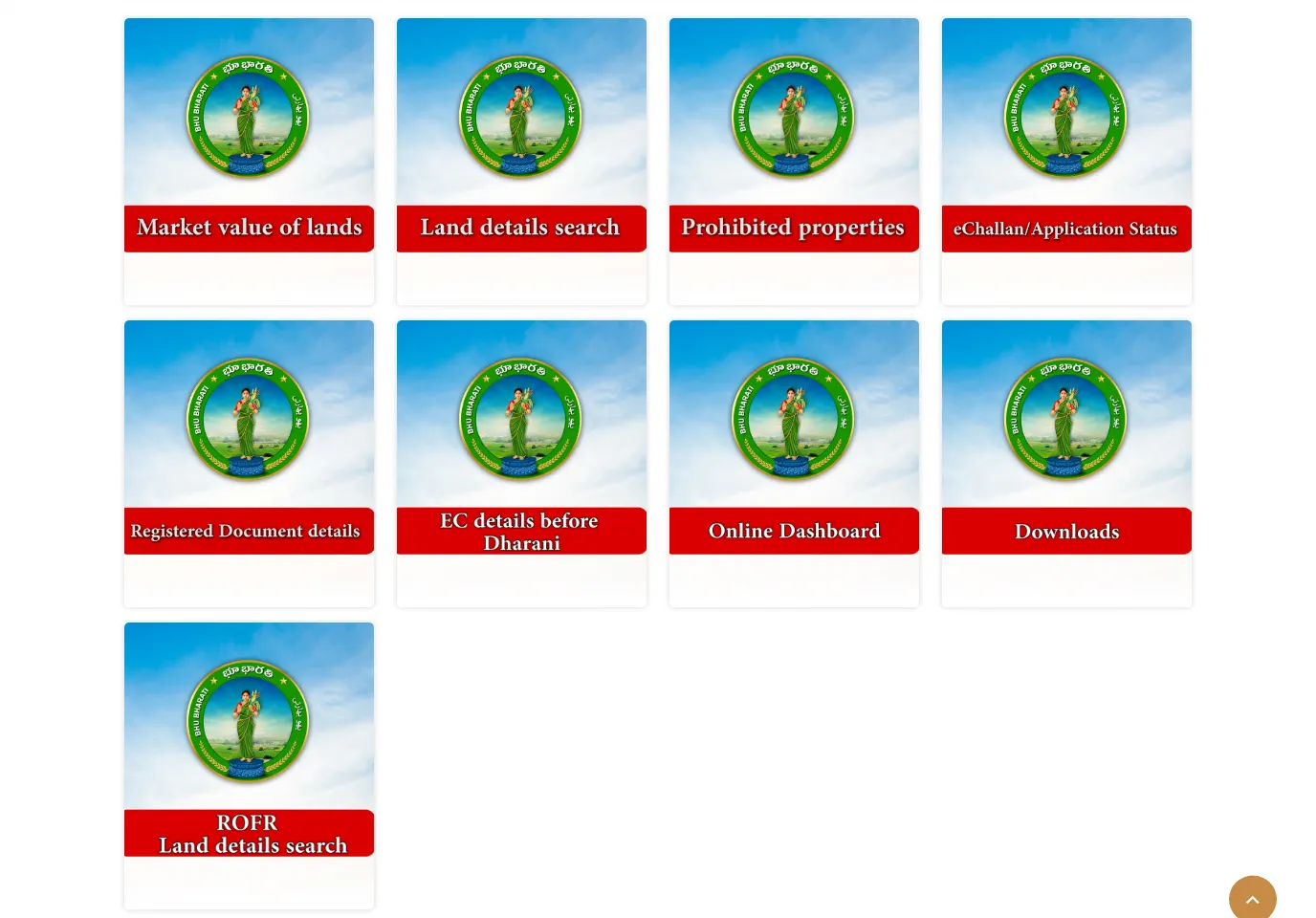 Bhu Bharati’s Information Services menu, captured 16 October 2026.
Not every tile in that menu is live. When we checked, EC details before Dharani, Online Dashboard and Downloads were placeholders that went nowhere, and Prohibited properties hands you off to the registration department, as our piece on Bhu Bharati’s prohibited land details explains. Land details search is the one that reliably returns a record. You can also go straight to it at bhubharati.telangana.gov.in/knowLandStatus.
No login, no OTP, no Aadhaar at the door. Just a CAPTCHA. That matters if you are checking from another city or another country.
Route 1: survey number plus khata
The form opens with Search By: Survey No./ Sub-Division No. already selected. You choose District, Mandal and Village from dropdowns. Then two more fields appear.
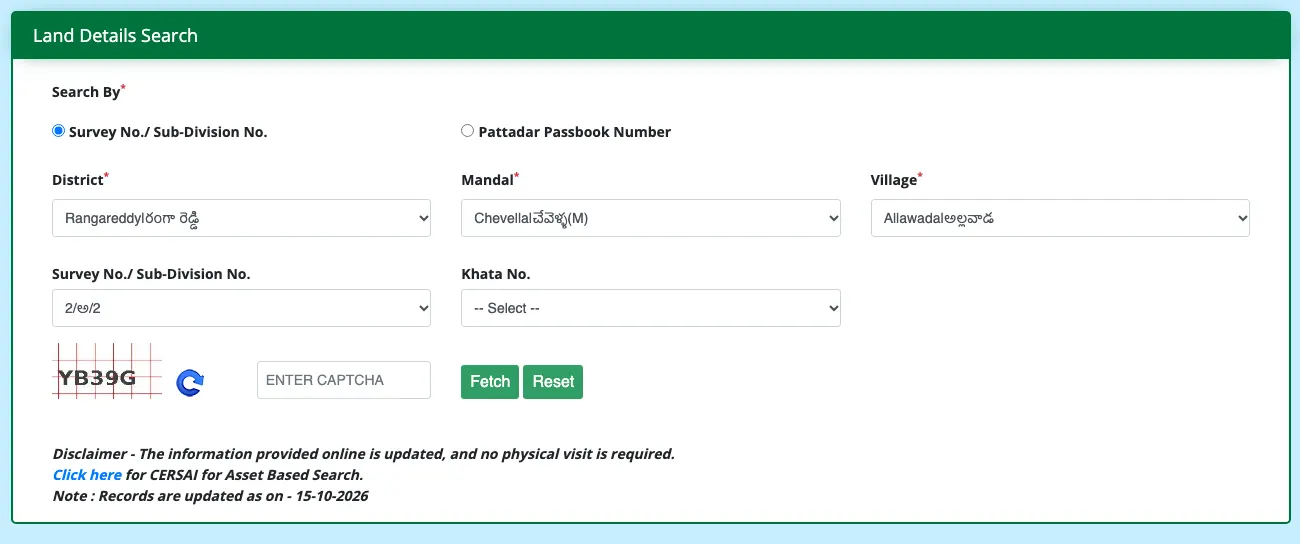 The survey route after choosing a village. The Khata No. list fills in only once a survey number is picked. Captured 16 October 2026.
Three things here are not obvious until you try it.
The survey number is a dropdown, not a text box. Once you pick a village, the portal lists that village’s survey and sub-division numbers. You cannot type a number in. If yours is not in the list, you have the wrong village, or the parcel is recorded under a different sub-division.
The khata number is required. After you pick a survey number, a Khata No. list appears with the khatas recorded against it. A khata is the revenue account a holding sits under, roughly one account per pattadar in that village. The form will not fetch without one. If a survey number has been split among several family members, you will see several khatas, and each one returns a different holder’s share.
Sub-division letters may be in Telugu. In a village we checked in Chevella mandal, the list showed numbers like 2/అ/2. In a village in Adilabad district, they were written 2/A/1 and 2/B. Your sale deed may use one style while the portal uses the other. Match by the number’s position and the extent, not the spelling.
Under the form sits a line worth noting: “Records are updated as on - 15-10-2026”. The land record side of the portal was current to the previous day when we checked. Screenshot it with your result. A dated record is far more useful later than an undated one.
Route 2: pattadar passbook number
Switch the radio to Pattadar Passbook Number and the district, mandal and village fields disappear. You get a single box for the passbook number.
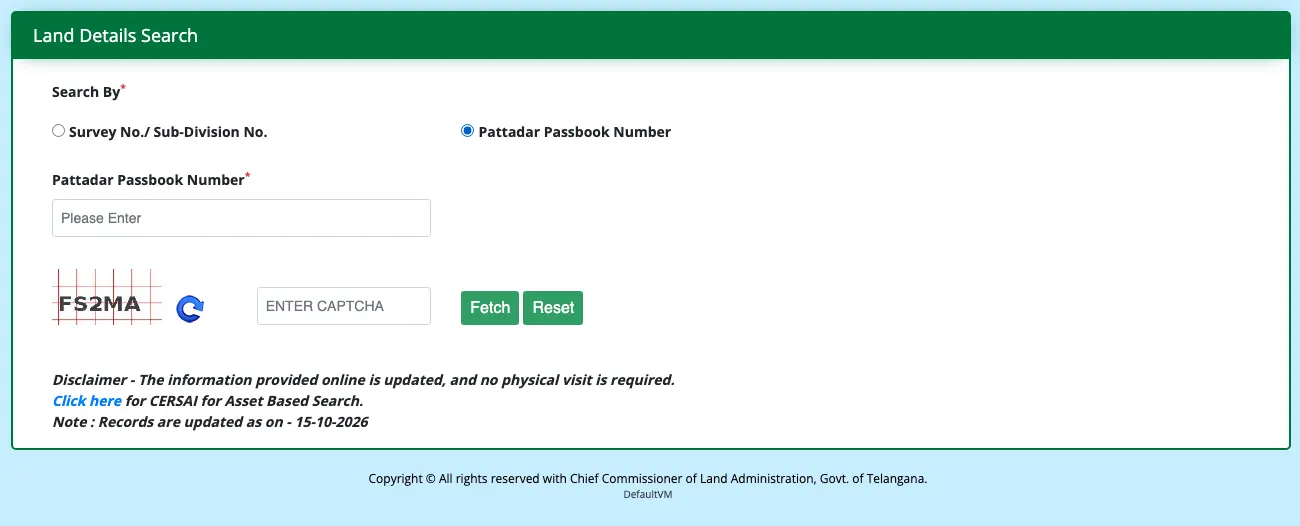 The passbook route. A second identity field appears once the portal recognises the passbook type. Captured 16 October 2026.
The pattadar passbook (PPB, the government-issued book that lists a holder’s parcels) number must be 12 characters. Once you enter it, the portal checks the passbook type and asks for one more detail:
| Passbook held by | Second field the portal asks for |
|---|---|
| An individual | First four digits of Aadhaar |
| A company, trust or firm | CIN, trust or firm number |
| A holder whose passbook is linked to a passport, such as many NRIs | Passport number |
If the number is not a digitally signed passbook, the portal rejects it with “Please enter valid Digitally Signed Passbook Number.” That message usually means you have an old manual passbook rather than an ePPB. Our pattadar passbook guide explains how to tell them apart and where the number sits on each.
This route is quicker than the survey route because one passbook covers every parcel in that holding. The trade-off is that you need the holder’s Aadhaar digits or passport number, which a remote relative may not have to hand.
What the result shows, and what each field means
A Land Details result comes in two panels. The labels below are from results we have pulled on the portal in 2026. The government does not publish a field-by-field guide to the public search, so treat this as observed rather than official.
| Field | What it tells you | What to check |
|---|---|---|
| Pattadar / Authorised Person Name | Who the revenue record lists as holder, often in Telugu script | Spelling against the deed and passbook |
| Father / Husband’s Name | The relation name used to tell same-name holders apart | Often the quickest way to confirm it is your family |
| Khata Number | The revenue account | Should match the passbook |
| PPB Number | The passbook, partly masked | First digits against your passbook |
| eKYC Status | Whether Aadhaar eKYC is done for the holder | Several Bhu Bharati applications begin with eKYC |
| Total Extent (Ac. Gts) | Area in acres and guntas | The digits after the point are guntas (40 to an acre), not a decimal fraction |
| Nature of Land | Patta, assigned, government and similar categories | Anything other than patta needs a closer look |
| Classification / Land Type | Wet or dry, agricultural or other | Against the deed’s description |
| Land Status | For example “Digital Signed” | Whether the entry is finalised |
| Market value of Survey no. | The government reference value | Not a sale price |
| Transaction Status | Whether a transaction or application is shown against the parcel | A dash means none was shown on that date |
Two rows deserve extra care. The extent trips up a lot of people: a figure like 2.20 means two acres and twenty guntas, not two and a fifth acres. And Nature of Land is where trouble often first shows. A parcel the family has held for decades can carry an assigned-land or government entry, which limits what can be done with it. If that happens, our guide to checking and correcting Bhu Bharati land-record errors covers what to gather before raising it.
Why there is no “search by name”
Plenty of pages promise a Bhu Bharati land details search by name. The live form does not have one. The page’s code still carries traces of an owner-name option, but no such field is shown to the public.
This is not new. In archived copies of the old Dharani search from 2019 and 2020, a “Pattadar Name” option existed in the page code but was hidden from view, and by 2022 it had been removed altogether. Telangana’s public land search has been identifier-first for years.
There is a reason for it. If anyone could type a name and see every parcel that person holds, so could anyone planning to forge a sale against an owner who lives far away. The portal’s FAQ goes further: it describes a Right to Privacy module that lets a pattadar “keep his information of his/her land details in privacy so that it will not be displayed to others.” So a blank result is not always a missing record. Sometimes the holder chose it.
For a wider look at the name question across urban and rural Telangana, including the GHMC property tax search, see how to check a property owner’s name in Telangana online.
When you have only a name
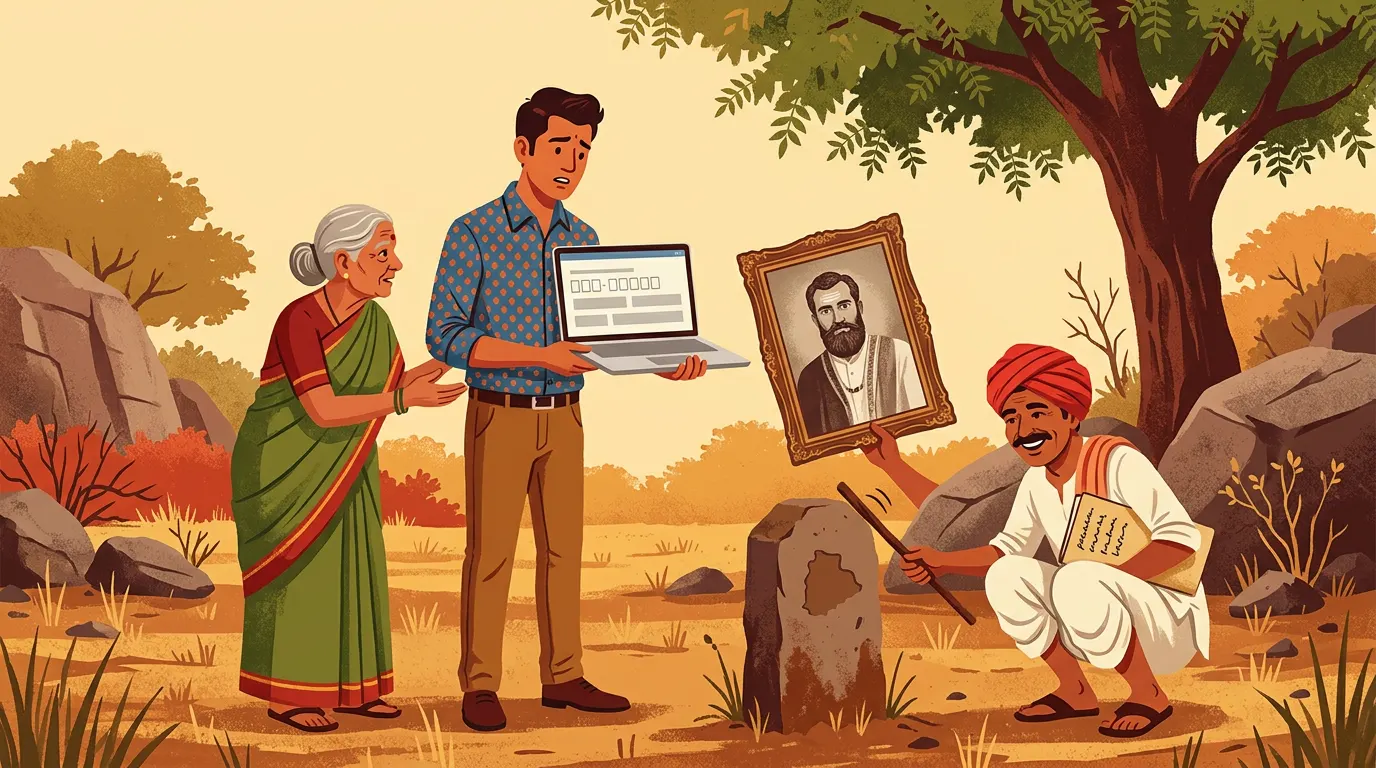
This is the most common situation behind these searches. A parent or grandparent held land in a village. Nobody has the passbook. Nobody remembers the survey number.
You have three honest options.
Recover an identifier from paper. Old registered deeds, land revenue receipts, a manual pahani copy, a court record or a bank loan file usually carry the survey number. Relatives in the village often know it, even if they do not know the khata.
Narrow down by village. If you know the village, the survey dropdown lists every survey number in it. With a rough idea of the parcel’s location, you can step through likely survey numbers and their khatas. Each fetch needs a CAPTCHA, so this is slow, but it uses only the official portal.
Start from the name with an index. Assetly’s family-land search takes a pattadar or family member’s name, an optional father’s or spouse’s name and the village, then shows possible parcel matches with their survey and khata details. It covers rural agricultural land in Telangana and Andhra Pradesh. Treat a match as a lead: take its survey number back to the Land Details Search and confirm it there.
Whichever route you use, the father’s or husband’s name is your best filter. Common names repeat across a village. The relation name usually separates them.
A result is a record, not a title
The Telangana Bhu Bharati (Record of Rights in Land) Act, 2025 gives the record real weight. Section 11 says: “Every entry in the Record of Rights shall be presumed to be true and correct until the contrary is proved or until it is otherwise amended in accordance with the provisions of this Act.”
That presumption is rebuttable, and courts have long been clear about what a revenue entry is for. In Jitendra Singh v. State of Madhya Pradesh (2021), the Supreme Court said a “mutation entry does not confer any right, title or interest in favour of the person and the mutation entry in the revenue record is only for the fiscal purpose.” The Telangana High Court put it more bluntly in Rashaveni Lingaiah v. State of Telangana (2026), writing about the earlier Record of Rights law: “It creates no title and destroys none.”
So read a Bhu Bharati result as the state’s working record of who holds the land and pays its revenue. Proof of ownership lives in the registered deed, the chain of earlier deeds and the Encumbrance Certificate for the period. When those disagree with the portal, the gap is usually a mutation that never happened or happened wrongly. Our explainer on mutation, khata and patta shows how that gap opens, and gaps like this sit behind a large share of the long-running disputes described in India’s property dispute crisis.
Common mistakes
Using a Dharani-era guide. Many tutorials still describe Dharani menus or a name search that is not there. Our Dharani to Bhu Bharati explainer maps the old tasks to the current services.
Picking the wrong revenue village. The revenue village on the record is not always the village people call home. A hamlet can sit inside a different revenue village. If the survey number is missing, try neighbouring villages in the same mandal.
Reading one khata as the whole survey number. A survey number split among heirs has several khatas. Pull each one before concluding who holds what.
Saving a screenshot without the date. Include the “Records are updated as on” line, or note the date and time yourself.
Treating the market value as a price. It is the government reference value used for stamp duty, not what a buyer will pay.
Expecting a map. Bhu Bharati has no public map or survey sketch, as of 16 October 2026. The Act says passbooks will include a survey or sub-division map “from the prescribed date”, which has not yet arrived. For prohibited-land locations specifically, our Telangana prohibited land map plots the published registers.
Step by step: checking land details from anywhere
- Gather what you have. Deed, passbook, revenue receipts, any old pahani. Note the district, mandal, revenue village and survey number.
- Open the Land Details Search at
bhubharati.telangana.gov.in/knowLandStatus. Use the passbook route if you have an ePPB and the holder’s Aadhaar digits. Otherwise use survey plus khata. - Pull every khata listed under the survey number, not just the first.
- Save each result as a PDF or screenshot with the freshness date visible.
- Compare field by field against the deed: name, relation name, extent in guntas, nature of land.
- Check the parcel against the prohibited registers with a survey-number check, since a clean land record does not mean the parcel is free to sell.
- Keep the file together. Results, deeds and any correction applications in date order. If you manage family land from a distance, keeping that file in one place, whether a shared folder or a tool like Assetly, makes the next check quicker.
Looking is free and remote. Acting is not. A correction, a mutation or a succession application usually needs eKYC, documents and sometimes a visit or a representative under a Power of Attorney drafted for that specific task. Verify first, then decide what is worth arranging.
Related Reading
- Dharani portal replaced: use Bhu Bharati for Telangana land records - which Bhu Bharati service handles each task.
- Telangana pattadar passbook (PPB) number guide - what the PPB identifies and how to read it.
- How to check and correct Bhu Bharati land-record errors - what to do when the result is wrong.
- How to check a property owner’s name in Telangana online - the routes for urban and rural property.
- Mutation, khata and patta - why a revenue record can lag behind a sale or inheritance.
Assetly helps property owners organise, verify and track their property documents digitally. Learn more.