

Search for Bhu Bharati prohibited land details and you will find a lot of pages explaining how to use a service that, at the moment, does not answer the question. The portal genuinely lists it. Go to bhubharati.telangana.gov.in, look under Information Services, and there it is between Details of Land and Encumbrance Details:
“Prohibited Lands Details”
Click it and you land on a page headed Prohibited Lands. What that page contains is one sentence:
“Please Click here to view Prohibited Properties.”
That is the whole service. It is a signpost, not a search.
Where the signpost points
The link goes to the Registration and Stamps Department at registration.telangana.gov.in/openProhibitedProperties.htm. That page is headed “SECTION 22A (1):PROHIBITION DETAILS”, and it asks for four mandatory fields:
- District
- Mandal
- Village/Town
- SRO OFFICE
Below the heading sits this notice:
“Prohibition data is under review. it will be published soon…”
Checked on 18 August 2026. The same notice was recorded on this page on 12 August, so it has been standing for at least six days rather than being a momentary outage.
Two things about that form deserve attention even when it is working. There is no survey number field. The search is scoped to a revenue village and a Sub-Registrar Office, which means it was never designed to answer “is my parcel prohibited”. And because the Revenue Department’s portal and the Registration Department’s portal converge on this one page, the two official online routes are not independent. When it is down, both are down.
So the honest answer to the query is that Bhu Bharati does not have a prohibited land search of its own. It has a link to someone else’s.
What Bhu Bharati does serve
The rest of the Information Services list is live, and worth knowing precisely because the prohibition route is not:
“Market Value for the specific land”, “Details of Land”, “Prohibited Lands Details”, “Encumbrance Details”, “Registered document details”, “EC Details Before Dharani”, “Online Dashboard”, “Download Documents”, “ROFR Lands Details”
Details of Land is the one people actually want. It opens a screen headed Land Details Search which takes District, Mandal and Village, and then lets you search by either Survey No. / Sub-Division No. or Khata number, with a separate field for a Pattadar Passbook number. You complete a captcha and press Fetch.
Read that field list again, because it settles a question a lot of people arrive with. Land Details Search has no owner-name field. Survey number, sub-division, khata, passbook: every route in is an identifier for a parcel you can already point to. There is no way to type a person’s name into Bhu Bharati and get back the land they hold. If a name is all you have, the routes that do work are the GHMC property tax search for urban property and the Encumbrance Certificate for the registered paper trail, both covered in our guide to checking a property owner’s name in Telangana.
Unlike the prohibition page, this one tells you how current it is. On 18 August 2026 the screen read:
“Records are updated as on - 17-08-2026”
alongside:
“Disclaimer - The information provided online is updated, and no physical visit is required.”
That is a land record lookup, not a prohibition check. It will show you what the revenue record says about the parcel. It is not designed to tell you whether the Sub-Registrar is barred from registering a document on it.
One aside worth flagging rather than concluding: the Prohibited Lands page sits at a route named for agricultural land. The portal does not document a scope limit anywhere on the page, so treat that as a question to put to the mandal office rather than as a settled fact about what the register covers.
The part that changes how you should read a blank result
Here is what makes the outage more than an inconvenience.
The prohibited register is not missing from Bhu Bharati. It is live inside it, at survey number granularity, and it is wired into the part of the portal that moves ownership.
The portal’s land details screen ships a check named checkprohibited. It runs against a specific survey number, and when that number is on the list it stops the action with this message:
“This survey number falls under prohibited list. Hence Mutation cannot be raised.”
Verified in the portal’s own code on 18 August 2026. The control is then disabled, so the application cannot proceed.
Read that against the public page being under review and the position is uncomfortable. The state can tell, per survey number, whether your land is prohibited. The public-facing service that is supposed to tell you the same thing is not currently serving that data. The check exists to block a transaction, not to inform an owner in advance, and there is no way to run it yourself before you file.
The practical consequence is a sequencing problem. Most owners are not refused at a search page. They are refused at a counter, after a sale agreement is signed, an advance has changed hands, or a mutation application has been prepared and paid for. The information that would have prevented that was in the system the whole time.
This is why a nil result from the public search proves very little, and why it is worth being precise about it. As covered in where the Telangana 22A prohibited list actually sits, Section 22A clauses (a) to (d) prohibit registration by category rather than by enumeration. Government land, assigned land, endowment and Waqf land, and ceiling-surplus land bind the registering officer whether or not any document with your survey number on it was ever published. A search that returns nothing, and a search that is not running at all, are both a long way from clearance.
What to do while the search is under review
The sequence that still works does not depend on the prohibition page.
Pull the land record first. Use Details of Land with your survey number or Pattadar Passbook number and save the output with its date. The freshness line matters here: a record dated to yesterday is a much better artefact than a screenshot with no date, and it is the document a revenue official will compare against.
Read the classification, not just the names. The prohibition usually follows from what the land is recorded as. Land classification and mode of acquisition are the fields that decide whether a clause (a) to (d) category bites, which is why checking and correcting Bhu Bharati record errors is the same piece of work as understanding a prohibition risk. A wrong classification and a prohibited entry are frequently the same problem seen from two ends.
Pull the encumbrance record too. Encumbrance Details and Registered document details are both live, and a registration history that stops abruptly is itself informative about a parcel.
Ask the Collectorate about the category, not the list. Clause (e) prohibitions run through government notifications compiled from District Collector reports, so the Collectorate is where a specific notification’s coverage can be established. “Which category, on what record” is a question an official can answer. “Show me the list” is not.
If there is an entry and you believe it is wrong, there is a defined route. Bhu Bharati’s own FAQ is direct about it. Asked how to apply for removal of a survey number from the prohibited properties list, the answer is:
“Apply in Grievance relating to prohibited properties list for removal from Prohibited List.”
That grievance appears on the portal’s homepage as a process flow in its own right, listed as “Grievance relating to inclusion in Prohibited Properties List”. The evidence you need depends entirely on which category was applied, and the step-by-step is covered in how to get a property removed from the Telangana 22A list.
Do not treat a broker’s PDF as current. Village-level prohibited lists circulate widely and some are genuinely official, but a PDF is a snapshot of a compilation date. It cannot capture a classification-based prohibition that was never enumerated, and it says nothing about what changed since.
The thing to take away
Bhu Bharati is a good portal having a bad week on one specific service, and the gap between what it knows and what it will tell you is unusually visible right now. The land record side is current to the day. The prohibition side is behind a notice pointing at another department. Meanwhile the register itself is live enough to stop a mutation dead with a one-line alert.
If you are buying, that asymmetry is the risk to plan around: the check that matters most is the one you cannot presently run, and it will run itself at the worst possible moment. Owners who already hold the land have more time but the same task, which is to establish the category behind any entry before it becomes a refused document.
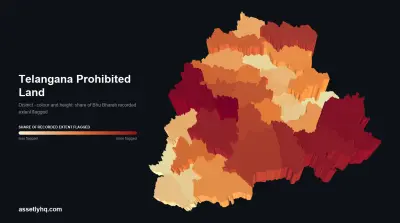
For the wider picture of how Telangana got here, Section 22A and why lakhs of private homes were flagged covers the scale, and the move from Dharani to Bhu Bharati explains why records carried forward the way they did. And for the measured position rather than the portal’s, Telangana’s prohibited land by district sets out how much of the Bhu Bharati register carries a flag, and which districts and mandals carry most of it.
If you searched for “Bhu Bharathi prohibited land details” and came away thinking the service was broken, it is closer to say it was never a search in the first place.
Related Reading
- The Telangana 22A Prohibited List: Why There Is No Single File to Download
- How to Get a Property Removed From the Telangana 22A List
- Section 22A: Why Telangana Flagged Lakhs of Private Homes as ‘Prohibited’
- Your Telangana Land Records May Have Errors. Here’s How to Check and Correct Them.
- Dharani to Bhu Bharati: Where to Check Telangana Land Records Now
Assetly helps property owners keep their land records, encumbrance certificates and prohibition checks in one place, so the evidence is ready before a counter asks for it.